
How CPU IO Wait Became an ASM Issue
You know the story? You start the day with a simple plan, but the universe rewrites the script, and before you know it, daylight turns into overtime darkness.
It started quietly. No database alerts.
No instance crash.
No complaints from application users — yet.
It’s just that checking the morning reports made a few systems look suspicious on CPU — they seemed abnormally utilized at that particular time of day.
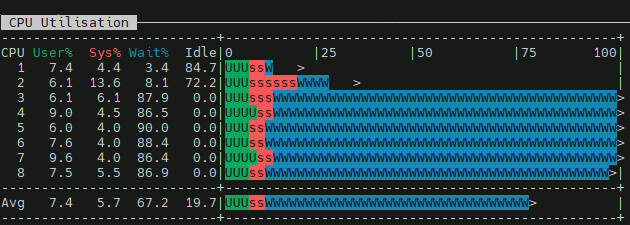
A high wa value indicates that the CPU is idle and stranded because it is waiting for slower storage devices or network I/O to finish, rather than being overworked by computational tasks.
Probably now is a good time to introduce a bit of architecture: Oracle 19c SE2 HA, two hosts, two storage arrays accessed via iSCSI — managed by ASM (with ASMLib) in NORMAL redundancy. One of the arrays presents its resources using multiple paths. The graph above comes from the node on which PROD is running.
First Suspicious Symptom
Let’s start digging into the I/O layer to find out if the problem is there:
$ iostat -xz 1
avg-cpu:  %user   %nice %system %iowait  %steal   %idle
           6.02    0.00    4.39   68.05    0.00   21.55

Device    r/s     w/s     rkB/s     wkB/s   rrqm/s   wrqm/s  %rrqm  %wrqm r_await w_await aqu-sz rareq-sz wareq-sz  svctm  %util
sda      0.00    1.00      0.00      4.00     0.00     0.00   0.00   0.00    0.00    0.00   0.00     0.00     4.00   1.00   0.10
dm-3     0.00    1.00      0.00      4.00     0.00     0.00   0.00   0.00    0.00    0.00   0.00     0.00     4.00   1.00   0.10
sdb      2.00   40.00      1.00     68.50     0.00     3.00   0.00   6.98    0.50    0.35   0.01     0.50     1.71   0.81   3.40
sdc    242.00   39.00   4112.00     68.00     0.00     3.00   0.00   7.14    0.44    0.36   0.12    16.99     1.74   0.90  25.40
This is interesting — in general the I/O looks healthy, no particular disk has a high r/w_await, yet the CPU is obviously suffering because of I/O wait.
Digging further — with iSCSI, the wait can be generated anywhere along the path from user space to storage: User space → Kernel → TCP → Storage.
$ ps -eo state,pid,comm,wchan:32 | grep ^D

D  876095 oracleasm-read- blkdev_direct_IO_simple
Process stuck in D state. Uninterruptible sleep. ASM is waiting for direct I/O — reads/writes that bypass the page cache and go straight to the block device. The process is blocked inside that kernel function, waiting for a block I/O operation to complete.
A few more checks:
$ multipath -ll
Hmmm no output.
No Ctrl+C.
Just a frozen terminal.
Why did multipath -ll hang instead of just erroring out?
$ lsblk
NAME        TYPE   SIZE FSTYPE      MOUNTPOINT
sda         disk   250G
├─sda1      part   600M vfat        /boot/efi
├─sda2      part     1G xfs         /boot
└─sda3      part 248.4G LVM2_member
  ├─ol-root lvm     15G xfs         /
  ├─ol-swap lvm     16G swap        [SWAP]
  ├─ol-home lvm     20G xfs         /home
  └─ol-u01  lvm  197.4G xfs         /u01
sdb         disk   150G
└─sdb1      part   150G oracleasm
sdc         disk  1000G
└─sdc1      part  1000G oracleasm
sdd         disk   150G
└─sdd1      part   150G oracleasm
sde         disk  1000G
└─sde1      part  1000G oracleasm
sdf         disk   150G
└─sdf1      part   150G oracleasm
sdg         disk  1000G
└─sdg1      part  1000G oracleasm
sr0         rom   1024M
I noticed that the list of devices in the iostat output was too short. Some devices were missing, and multipath wasn’t doing its job:
$ systemctl status multipathd.service
● multipathd.service - Device-Mapper Multipath Device Controller
   Loaded: loaded (/usr/lib/systemd/system/multipathd.service; disabled; vendor preset: enabled)
   Active: inactive (dead)
So multipath was dead — and what’s more, it was disabled, meaning the system had been running in single-path mode since the last reboot.
Because multipathd was dead, the multipath -ll command hang, it tried to connect to its socket — which didn’t exist. On top of that, scanning block devices through ioctl hit the exact same stale iSCSI paths that already had oracleasm stuck in D state. So multipath -ll joined the queue of processes waiting for I/O that was never coming back. Welcome to the club.
But something must have changed recently, because suddenly some devices had disappeared:
$ dmesg -T | egrep -i "reject|I/O error|offline|timed out"
Output showed info about some devices going offline, here’s a little snippet:
session recovery timed out after 120 secs
sd 34:0:0:2: rejecting I/O to offline device
blk_update_request: I/O error, dev sdd
blk_update_request: I/O error, dev sde
Buffer I/O error on dev sde
rejecting I/O to offline device
Those 120 seconds are not random — that’s the default value of node.session.timeo.replacement_timeout in /etc/iscsi/iscsid.conf. It defines how long the iSCSI layer waits for a session to recover before giving up and marking the device offline. Which also explains exactly how long the D-state processes were stuck before the kernel started returning I/O errors.
After contacting the infrastructure team, I was informed that firmware had been updated on the storage array controller. That made sense — some paths went offline on the array that presents its resources via multipath. Because the multipathd daemon was off, there was nothing to handle the failover, so those devices simply went offline on the OS side as well.
So far the picture looked like this:
Oracle ASM
   ↓
direct I/O
   ↓
block device layer
   ↓
multipathd: dead — no failover possible
   ↓
iSCSI session (broken)
   ↓
session recovery timeout (120s — default node.session.timeo.replacement_timeout)
   ↓
task -> D state
   ↓
CPU -> iowait
Trying to bring back order.
First things first: bring multipathd back to life on both nodes and refresh the iSCSI paths, since the OS was still trying to use stale ones.
Meanwhile, ASM had already noticed something was wrong — each disk group was reporting one disk missing:
SQL> select NAME, GROUP_NUMBER, LABEL, PATH, MOUNT_STATUS, VOTING_FILE, FAILGROUP, HEADER_STATUS, FAILGROUP_TYPE, STATE from v$asm_DISK order by MOUNT_STATUS;

NAME       GROUP_NUMBER LABEL      PATH                                MOUNT_S V FAILGROUP       HEADER_STATU FAILGRO STATE
---------- ------------ ---------- ----------------------------------- ------- - --------------- ------------ ------- --------
RECO2                 2  RECO2     ORCL:RECO2                          CACHED  Y FG2             MEMBER       REGULAR NORMAL
RECO_0002             2            /mnt/votedisk/vote_disk             CACHED  Y FG3             MEMBER       QUORUM  NORMAL
DATA2                 1  DATA2     ORCL:DATA2                          CACHED  N FG2             MEMBER       REGULAR NORMAL
DATA1                 1                                                MISSING N FG1             UNKNOWN      REGULAR NORMAL
RECO1                 2                                                MISSING N FG1             UNKNOWN      REGULAR NORMAL
Taking advantage of the redundant storage array architecture, the plan was to simply log out and log back into the iSCSI sessions on both hosts — forcing the OS to rediscover the block device paths from the affected array. Since Automatic Storage Management library kernel driver is used to manage disk devices, that layer needed refreshing too.
At this point, the HA architecture proved its worth — the database kept running without interruptions or data corruption even with one storage array effectively gone.
[root@host1 ~]# iscsiadm -m node -T Storage.Target-1 --logout
Logging out of session [sid: 2, target: Storage.Target-1, portal: 10.0.0.11,3260]
Logging out of session [sid: 3, target: Storage.Target-1, portal: 10.0.0.10,3260]
Logout of [sid: 2, target: Storage.Target-2, portal: 10.0.0.11,3260] successful.
Logout of [sid: 3, target: Storage.Target-2, portal: 10.0.0.10,3260] successful.

[root@host1 ~]# oracleasm scandisks
Reloading disk partitions: done
Cleaning any stale ASM disks...
Cleaning disk "DATA1"
Cleaning disk "RECO1"
Scanning system for ASM disks...

[root@host1 ~]# iscsiadm -m node -T Storage.Target-1 --login
Logging in to [iface: default, target: Storage.Target-1, portal: 10.0.0.11,3260]
Logging in to [iface: default, target: Storage.Target-1, portal: 10.0.0.10,3260]
Login to [iface: default, target: Storage.Target-1, portal: 10.0.0.11,3260] successful.
Login to [iface: default, target: Storage.Target-1, portal: 10.0.0.10,3260] successful.

[root@host1 ~]# oracleasm scandisks
Reloading disk partitions: done
Cleaning any stale ASM disks...
Scanning system for ASM disks...
Instantiating disk "RECO1"
Instantiating disk "DATA1"
Now I could try to online missing disks on ASM level:
SQL> ALTER DISKGROUP DATA ONLINE DISKS IN FAILGROUP FG1;
But at this point something unexpected happened:
ORA-15032: not all alterations performed
ORA-15075: disk DATA1 is not visible on instance number 1
Same for RECO:
ORA-15075: disk RECO1 is not visible on instance number 1
ASM alert log:
ORA-15186: ASMLIB error function = [asm_open(global)]
ORA-15025: could not open disk "ORCL:DATA1"

ORA-15186: ASMLIB error function = [asm_open(global)]
ORA-15025: could not open disk "ORCL:RECO1"

WARNING: Read Failed. group:0 disk:0 AU:0 offset:0 size:4096
path:Unknown disk
         incarnation:0xf0f2cbfa asynchronous result:'I/O error' ioreason:2818 why:11
         subsys:Unknown library krq:0x7fe6132e7cd0 bufp:0x7fe618836000 osderr1:0x434c5344 osderr2:0x0
         IO elapsed time: 0 usec Time waited on I/O: 0 usec
WARNING: Read Failed. group:0 disk:2 AU:0 offset:0 size:4096
path:Unknown disk
         incarnation:0xf0f2cbfc asynchronous result:'I/O error' ioreason:2818 why:11
         subsys:Unknown library krq:0x7fe6132e7380 bufp:0x7fe618832000 osderr1:0x434c5344 osderr2:0x0
         IO elapsed time: 0 usec Time waited on I/O: 0 usec
Hmm, this is strange. ASMLib showed the correct list of devices:
[root@host1 ~]# oracleasm listdisks
DATA1
DATA2
RECO1
RECO2
But checking what the ASM instance could actually see via kfod told a different story:
[root@host1 ~]# kfod disks=all
--------------------------------------------------------------------------------
 Disk          Size Header    Path                               User     Group
================================================================================
   1:        500 MB MEMBER    /mnt/votedisk/vote_disk            grid     asmdba
   2:    1023999 MB MEMBER    ORCL:DATA2
   3:     153599 MB MEMBER    ORCL:RECO2
--------------------------------------------------------------------------------
That made me scratch my head. I started thinking that maybe the disk headers were corrupted and I’d have to DROP the disks from the disk groups, clean/overwrite them, add them back, and resynchronize. But after a while I ran the same command on the other host and got a completely different output — there was a clear mismatch in what the ASM instances could see on host1 vs host2:
[root@host2 ~]# oracleasm listdisks
DATA1
DATA2
RECO1
RECO2

[root@host2 ~]# kfod disks=all
--------------------------------------------------------------------------------
 Disk          Size Path                                     User     Group
================================================================================
   1:        500 MB /mnt/votedisk/vote_disk                  grid     asmdba
   2:    1023999 MB ORCL:DATA1
   3:    1023999 MB ORCL:DATA2
   4:     153599 MB ORCL:RECO1
   5:     153599 MB ORCL:RECO2
--------------------------------------------------------------------------------
Root cause.
The root cause became clear when I listed the block device properties for the oracleasm disks at the OS level:
[root@host2 ~]# ls -l /dev/oracleasm/disks
total 0
brw-rw----. 1 grid asmadmin 252,  7 Apr 13 15:52 DATA1
brw-rw----. 1 grid asmadmin   8, 97 Apr 13 15:42 DATA2
brw-rw----. 1 grid asmadmin 252,  5 Apr 13 15:53 RECO1
brw-rw----. 1 grid asmadmin   8, 81 Apr 13 15:42 RECO2

[root@host1 ~]# ls -l /dev/oracleasm/disks
total 0
brw-rw----. 1 grid asmadmin 8, 65 Apr 13 15:58 DATA1
brw-rw----. 1 grid asmadmin 8, 97 Apr 13 15:58 DATA2
brw-rw----. 1 grid asmadmin 8, 17 Apr 13 15:58 RECO1
brw-rw----. 1 grid asmadmin 8, 81 Apr 13 15:58 RECO2
On host2, DATA1/RECO1 use major 252 (device-mapper/multipath dm-* devices), while on host1 they show as major 8 (raw sd* devices).
On host2 it’s as it should be:
- DATA1 → 252,7 → /dev/mapper/mpatha1
- RECO1 → 252,5 → /dev/mapper/mpathb1
But on host1:
- DATA1 → 8,65 → /dev/sde1
- RECO1 → 8,17 → /dev/sdb1
This means oracleasm on host1 is pointing at raw sd* paths instead of the multipath device.
When oracleasm scandisks ran on host1, it likely found the disk header on the sd* device first, before the mpath alias was scanned. But why?
The Fix
How does ASMLib know in which order to scan devices? There is a configuration file that controls this behaviour — /etc/sysconfig/oracleasm:
ORACLEASM_SCANORDER="mpath sd"
Looks reasonable — one array presents resources via multiple paths, the other uses a single path, so mpath sd seemed like a sensible configuration.
The issue can probably have many solutions or workarounds. I’ve picked a simple one. Looks like ASMLib could miss mpath because mpath* names are userspace aliases — symlinks created by udev rules that appear only after the Device Mapper device already exists. The dm-* devices, on the other hand, are the actual kernel block devices, available immediately once multipathd assembles the multipath map. During disk discovery, depending on udev timing, ASMLib could win a race condition and grab the sd* device before the mpath* alias was ready.
To be precise about what each prefix in ORACLEASM_SCANORDER actually does:
dm— scans/dev/dm-*directly, i.e. the real kernel Device Mapper block devices; available as soon asmultipathdcreates the mapmpath— scans/dev/mapper/mpath*symlinks; created by udev rules and may appear with a slight delay or inconsistent orderingsd— raw SCSI block devices, one per physical path; exactly what you don’t want ASMLib to pick when multipath is in play, but because of the second single-path storage array it’s here
So putting dm first in the scanorder ensures ASMLib finds the Device Mapper device before it ever gets to the sd* devices underneath it. Different nodes selected different devices at scan time. ASM treated them as different disks — because from its perspective, they were.
Changing scanorder values by adding dm into it did the job:
ORACLEASM_SCANORDER="dm mpath sd"
After rescanning disks via oracleasm, the major numbers in /dev/oracleasm/disks were correct — pointing to the mpath devices. kfod started showing all disks on both hosts.
No need to DROP anything.
Just bring them online:
ALTER DISKGROUP DATA ONLINE DISKS IN FAILGROUP FG1;
ALTER DISKGROUP RECO ONLINE DISKS IN FAILGROUP FG1;
Final state:
NAME       GROUP_NUMBER LABEL      PATH                                MOUNT_S V FAILGROUP       HEADER_STATU FAILGRO STATE
---------- ------------ ---------- ----------------------------------- ------- - --------------- ------------ ------- --------
DATA2                 1 DATA2      ORCL:DATA2                          CACHED  N FG2             MEMBER       REGULAR NORMAL
DATA1                 1 DATA1      ORCL:DATA1                          CACHED  N FG1             MEMBER       REGULAR NORMAL
RECO_0002             2            /mnt/votedisk/vote_disk             CACHED  Y FG3             MEMBER       QUORUM  NORMAL
RECO1                 2 RECO1      ORCL:RECO1                          CACHED  Y FG1             MEMBER       REGULAR NORMAL
RECO2                 2 RECO2      ORCL:RECO2                          CACHED  Y FG2             MEMBER       REGULAR NORMAL
Conslusion
There’s more than one way to skin this cat. An alternative fix would have been to present the single-path array’s disks through multipath as well — a single-path multipath device is still a valid multipath device. That would make the entire ASM disk landscape uniform: everything goes through /dev/dm-*, ORACLEASM_SCANORDER becomes a non-issue, and the race condition with udev has nowhere to hide. The downside is that it requires a properly configured multipath.conf and — more importantly — a multipathd that actually stays running. Which, as we’ve seen, is not something you want to take for granted.
Another option worth mentioning is replacing ASMLib altogether with udev rules. udev can stamp ASM disk headers and manage device ownership just fine without the kernel module, and it’s actually the preferred approach on newer systems where ASMLib is no longer actively developed. The catch in this particular situation: migrating from ASMLib to udev rules is not an operation which I would like to make online. So that one goes on the backlog.
The fix applied was pragmatic — one config line, no downtime, no DROP DISK drama. Sometimes that’s exactly the right call.
ASMLib, udev, AFD, each occupying the same territory. But which one belongs in your architecture? That’s a different story.